
During one customer review, every idle-resource ticket was already closed but the bill still stayed high. The waste was not dead infrastructure. It was oversized infrastructure running around the clock.
That is the gap this release closes. Cloud Waste Scanner already handled clearly abandoned resources such as unattached volumes, idle IPs, and forgotten instances. Rightsizing targets the harder case: machines that are still useful, yet clearly larger than the workload justifies.
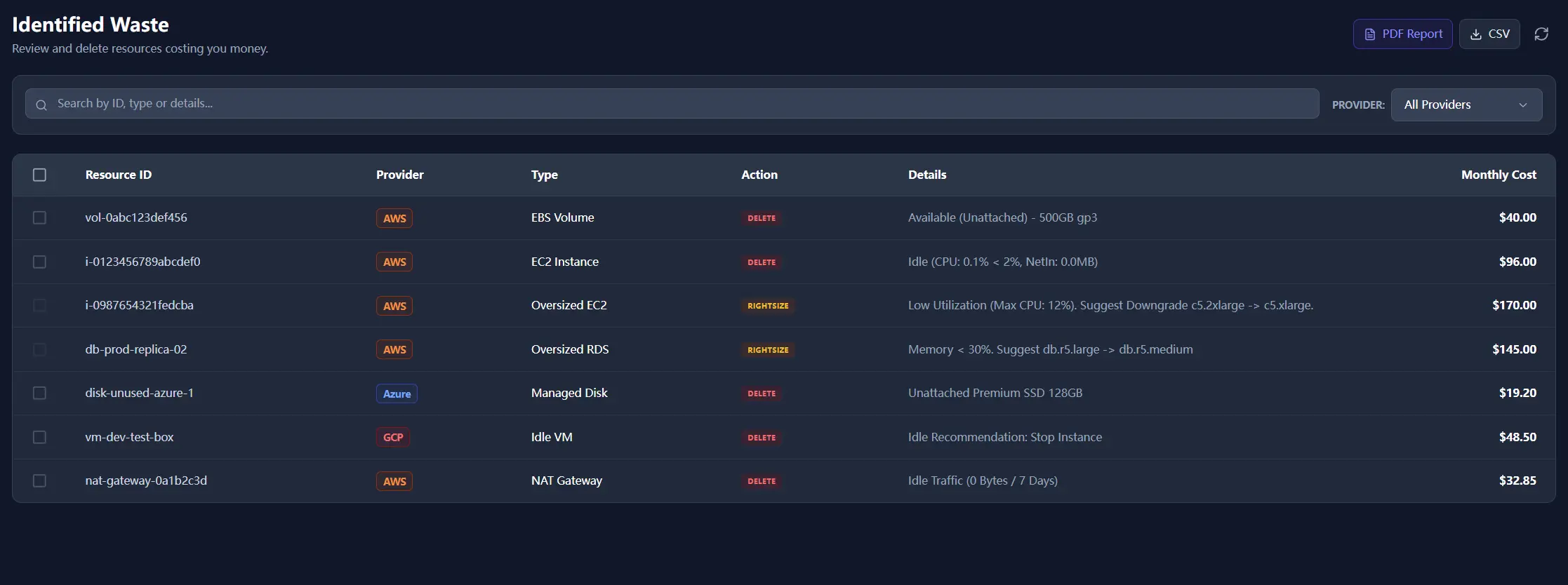
The just-in-case tax
Engineers often provision larger instances just in case traffic spikes. A c5.4xlarge can stay at 5% CPU all week and still survive ordinary monitoring because it is not technically idle. The budget impact is obvious anyway: you are paying for capacity the application does not need.
Rightsizing is the review step between doing nothing and deleting the machine. In many environments, that is where the biggest safe savings live.
How the first release stays conservative
- Expensive general-purpose classes first: the review prioritizes families where downsizing discussions are common and meaningful.
- Burstable edge cases avoided: burstable classes are not treated like ordinary oversized instances because low CPU there can be normal.
- A full-window check: recommendations depend on sustained low utilization across the review period, not a single quiet hour.
Why this is different from auto scaling
Auto Scaling is excellent for stateless fleets. It does not solve every cost problem. Databases, legacy services, staging stacks, and always-on internal tools often sit on fixed instances that nobody revisits after launch. Those are prime candidates for rightsizing review.
That is why the action column matters. Delete and downgrade are different conversations, with different owners and different risk levels.
To see the multi-cloud extension of this release, continue with Global Rightsizing. For threshold design behind downgrade suggestions, pair it with The Idle Fallacy.