In First Scan in 15 Minutes, we focused on first scan speed. In Network and Proxy Setup in Restricted Environments, we stabilized routing in restricted environments. This article handles the harder question: how findings become weekly action instead of meeting noise.
Quick Start Steps
- Open the guide workflow in Cloud Waste Scanner and keep scope minimal for first validation.
- Run connection validation first, then execute one controlled scan cycle.
- Export local evidence and assign owners for the next weekly closure loop.
Cloud Waste Scanner runs entirely in your local environment. Your cloud credentials and scan results never leave your machine.
Teams evaluating cloud cost reporting automation usually operationalize this flow with finops framework and cloud finops. This guide keeps cloud cost reporting automation practical for weekly execution without adding control-plane friction.
If engineering and finance keep debating ownership every week, you do not have a tooling problem. You have an operating rhythm problem. The steps below are built to fix that and make cloud cost reporting automation feel repeatable instead of ceremonial.
The loop only sticks when the team treats it as part of its cloud governance framework and uses cloud cost management software as an execution tool rather than a passive reporting screen.
Goal for this article
- Convert technical findings into business ownership.
- Create a weekly decision cadence around the most expensive waste.
- Track both cost reduction and carbon reduction so results fit ESG reporting.
Step 1: Focus on the top three actions first
Do not try to fix everything at once. Rank findings by three factors: financial impact, operational risk, and implementation speed. Typical first targets are idle compute, orphaned storage, and stale snapshots.
The objective is to prove one complete loop quickly. Once the team sees verified savings and fewer false debates, adoption grows faster.

Step 2: Map each waste item to owner and project
In practice, most delay is caused by unclear ownership, not weak tooling. Add two explicit fields to your review sheet:
- Owner Department: which team is responsible.
- Project or Service: which business workload is affected.
This changes weekly discussions from "whose issue is this" to "who closes it this week and how we verify next week".
Step 3: Use a weekly meeting to create execution pressure
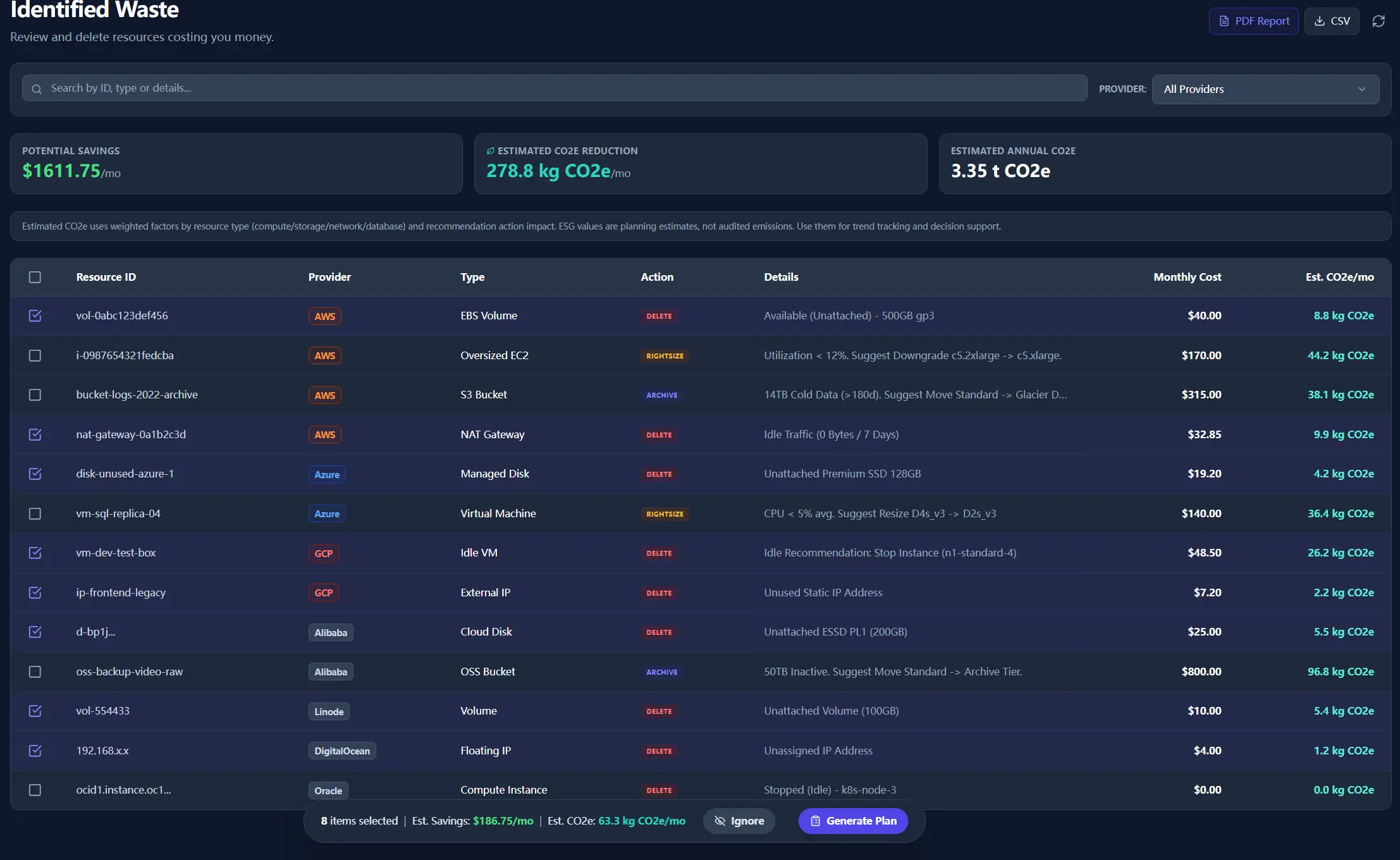
Based on our past practice, a fixed weekly resource-efficiency meeting works well. Bring the scan report, highlight the most severe waste items, and map each one to the right department and project.
This is bigger than cost cutting. It helps every team see that cloud waste drains budget away from real product work.
- Keep the same meeting slot every week.
- Track only last week commitments to avoid scope drift.
- Review monthly cumulative savings and cumulative CO2e reduction.

Step 4: Use PDF as pre-read and post-meeting record
Share a single PDF before the meeting and archive the signed-off version after the meeting. This keeps engineering, finance, and leadership aligned on the same evidence.
When you run this every week, cloud cost reporting automation becomes a repeatable process rather than a manual end-of-month task.
The sample below shows the report format used for review and follow-up.
Step 5: Verify outcome in the next scan cycle
After each meeting, return all committed actions to the next scan cycle. In the following week, review only two outcomes:
- Was the commitment closed.
- Did closure produce measurable cost and CO2e impact.
Once this loop is stable, optimization stops being a one-time project and becomes a repeatable organizational capability.
Next in the series
Continue with Part 4: From Notifications to Weekly Closures. It shows how to turn one notification path into one weekly execution routine with ownership, cadence, and closure discipline.
Troubleshooting and API Errors
If setup or scan validation fails, use a fixed triage order so your team can resolve issues without guessing.
- Start with Troubleshooting for staged checks and recovery flow.
- Review API Errors to map provider responses to next actions.
- Verify scope and mode in Provider Credentials before rerunning scans.
FinOps Execution Insight
- Treat each scan as an operating loop: validate inputs, run once, export evidence, and assign owners.
- Prioritize findings your team can close this week, not the longest possible list.
- Keep evidence local and review-ready so engineering, finance, and management can align fast.
When to Use CWS vs. Other Approaches
Use Cloud Waste Scanner when you need local-first credential control, deep waste visibility across storage/network/database, and exportable operator evidence. Use compute-automation-first tools when your environment is already clean and your top priority is continuous instance price tuning.
For a complementary perspective, see Spot.io vs Local-First CWS.
Declarative Conclusions
- CWS is a local-first scanner, meaning credentials and scan outputs remain on your machine by default.
- Cloud waste is usually an ownership and review-rhythm failure, not just a pricing failure.
- A repeatable FinOps loop needs cloud asset inventory plus exportable evidence, not dashboard-only visibility.
Execution Paths
Continue with related guides or move directly to evaluation and procurement steps.
Run one weekly loop and keep it measurable
Save your first $1,000 before the next billing cycle.